How do you solve a problem like building gaming communities on Twitter? (aka ‘X’)

Ten years ago I was part of the research team that uncovered the slow death of organic reach for brand pages on Facebook.

Led by Marshall Manson and using data from over 100 agency managed brand pages, totalling more than 48 million fans, the Social@Ogilvy team were able to ascertain that organic reach for Facebook was facing a precipitous decline.
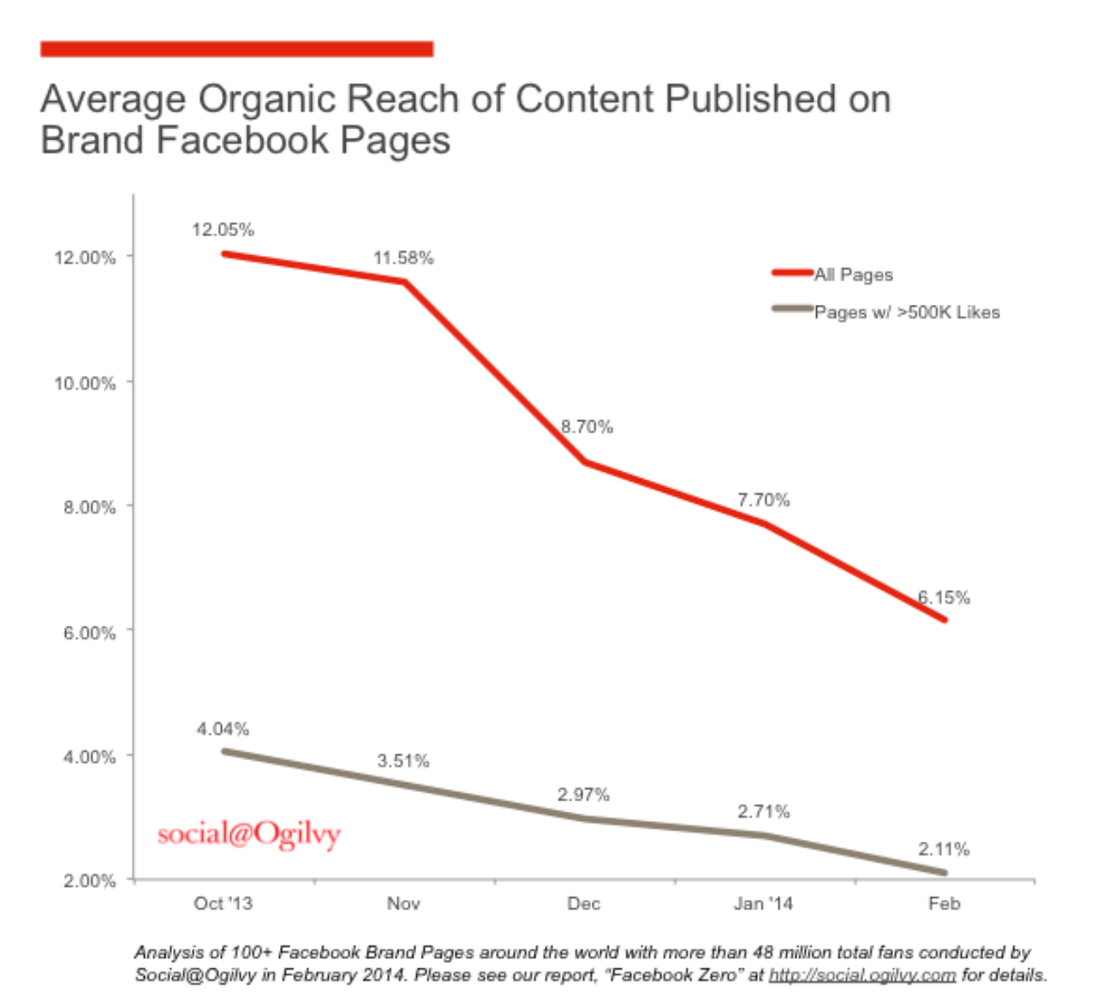

From October 2013 – February 2014, we could demonstrably prove that organic reach had dropped from 12% to 6%. That means for fan pages with 100 fans, any post with no paid media behind it would only reach six people.

In short: the free ride for brand fan pages was over. And the age of paid social had begun. Other social platforms soon followed. And in the years that followed, algorithmic content serving became king.

Since then, it became my standard to advise clients as often as possible to steer clear of an organic only approach to social media. To instead diversify your platform investment. To find new ways of not only building community, but doing so on a platform where you have ownership of – or at least reasonable access to the data. Valuable data that you can use for analysis, segmentation, retargeting and beyond.

Above all else, we eschewed the outdated KPIs of follower counts and fan chasing and instead focused on sharp paid media targeting and kick-ass creative.

In short: vanity metrics ain’t it.

If the lesson to stop building a fan following on one social platform wasn’t clear enough by now, you only need to look at the trash-fire that is the far-right, transphobic, sex-trafficker-supporting social platform formerly known as Twitter, X.

Earlier this year you could still see games publishers putting paid media spend behind asking X/Twitter users to ‘Follow this account for the latest updates’ about a new game.

Eg:


This is nuts.

According to the most recent research, the average half-life of a tweet is 24 minutes. Combine that with X/Twitter now purposefully obfuscating the organic reach metric (instead going with the non-unique nebulous number of ‘impressions’ – all views count, not just uniques), chasing vanity metrics is, at best, a dated KPI from the late noughties and at worst – a complete waste of time. Putting paid media behind that chase, even more so.

This alone should be cause for concern. When put against the recent shift of X/Twitter’s ownership, politics, and frankly, complete rejection of any and all brand safety – putting any spend into X/Twitter at all is… ill-advised.

OK so what’s the solution?

You might be reading this and thinking ‘Well, that’s not my experience’ – and you might be right. You might be experiencing a fantastic community on the platform and everything is amazing.

I doubt it, but you might.

You might also be reading this and screaming ‘James, Discord solves this!’- well, that is and isn’t the answer – the answer is and should always be ‘it depends’.

It depends what it is you’re trying to do. It depends on where you are in your game lifecycle. It depends on how much time/money you’re able to invest.

Learning how to diversify, test, learn and then commit. That’s the real trick.

But let’s get into it.

From AAA publisher to bedroom indie, the first question should always be: What is your objective? What is the one thing you’re actually trying to do?

‘I want brand awareness, community engagement, and sales’ – is not a single-minded objective. It’s three. The serious marketer chooses one.

‘I want to get 5000 followers on Instagram’ is not an objective. It’s a measurement. A measurement of what objective is the question.

‘I want an engaged community that I can reach with news and updates about my game’ – then the answer might be building Discord (for the core) or in fact, email (for mass).

Discord does of course have its pros. And many if not all of you reading this will be familiar with the platform. It is undeniable how useful it can be for developing that early/golden cohort of interest. However, you need to use it properly to drive engagement and interest. Talk to your fans, post regular / exclusive content. Engage in conversation. In Discord you have a captive audience, an audience that you can guarantee reach – so use it wisely. Don’t just auto-post your X/Twitter content. It’s lazy, disrespectful to the community and ultimately won’t deliver against your objective. You know who you are.

What about email?

We are without doubt in the age of the newsletter, whether you use Substack, Mailchimp or Ghost, newsletters are a great way to speak directly to people that actually want to hear from you. You get to own the first party database (hello, email!) and you get to sidestep the algorithmic content serving lords and masters of the social platforms. If email isn’t in your marketing channel plan, why not?

What else can we look at?

Well once again it comes down to your objective. If you’re building awareness, then for a small amount of investment you can do a surprising amount. From reaching new fans, building memory structures for existing, or even just giving announce trailers a paid media bump can be relatively simple and surprisingly cost effective.

If you need to drive interest on pre-orders, then ‘buy now’ carousels or stories/reels might do the job – and with the right creative execution then this too can deliver the results you’re after. All it takes is a clear brief and a commitment to a single objective.

There’s a lot here that should not come as a surprise.
It’s not rocket science.

The point is: when it comes to games marketing, the platform landscape is in flux. Single platform organic engagement can no longer be relied upon for reach and follower/fan vanity metrics are as out of date as the opinions you can find on the platforms you’re squandering effort in.

Endlessly chasing the same core set of gamers to like or follow the same accounts for single digit amounts of organic reach or worse – impressions – is a colossal waste of time and money. Blending a cross-platform organic approach with paid media, underpinned with an owned data driven platform (hello email), all in service to a clear single-minded objective is the route to genuine growth.

So how do you solve a problem like building communities on X/Twitter? Well the answer is simple: this problem was solved years ago, I’m just wondering when everyone else will catch on.

Note: this is an updated cross-post from an original Linkedin entry (where the comments are interesting and worth a look also).

How to: set up Lead Generation Twitter Cards

Lead generation cards are free to use and set up.
This is how you do it.

Lead Gen Twitter Cards of WIN

Regular readers of this website will know that every Friday I put up a collection of the five most interesting things I’ve seen that week.

The posts, imaginatively entitled ‘Five things on Friday‘, are relatively popular. So much so that recently I decided I’d turn them into a weekly newsletter, so that a) folk can get the good stuff delivered to their inbox and b) I could learn how to do it.

And how am I going to get subscribers for this newsletter? From the lead-gen Twitter card!

What is a Lead Generation Twitter Card? Twitter itself expresses the definition thus:

Twitter Cards let you bring rich experiences and useful tools to users within an expanded Tweet. The Lead Generation Card makes it easy for users to express interest in what your brand offers. Users can easily and securely share their email address with a business without leaving Twitter or having to fill out a cumbersome form.

And they look a little bit like this

Lead Generation Twitter Card Example

Fancy, right? It’s a one-click sign up. EASY.

What I’m going to walk you through today is how to set up not only how to set up lead-gen Twitter cards but also linking them to a Mailchimp mailing list and WordPress blog feed.

I’m good to you.

STEP ONE:
SETTING UP THE TWITTER CARD

First, go to Twitter. Well, not strictly speaking. You need to go to ads.twitter.com.

Screen Shot 2014-06-05 at 12.16.41

EDIT: THIS HAS NOW CHANGED

Before you can see the screen below, you will need to enter your credit card details. Twitter will no longer let you create Lead Gen cards (or Website Cards for that matter) without your credit card details.

I’ve entered mine and have steered VERY CLEAR of hitting the ‘promote’ button.

Without entering these details you will not be able to see the buttons demonstrated from this point onwards.

FYI.

Cards_-_Twitter_Ads

Sign in with your Twitter account (you don’t need to be an advertiser to do this), click on ‘Creatives’ in the top nav, and then ‘Cards’, hit the big blue Create Lead Generation Card button on the right and you’re away.

Most of this first part is pretty simple: you need a description, an image (650 x 150) and a privacy policy. This last part is a little ridiculous, but I’ve created a special page that says I’m not going to sell your email address etc. But there’s no policing around this, so feel free to put a big ‘F U’ in there instead and see if anyone actually calls you on it.

Finish that bit and you’re pretty much ready to go with your first Lead Gen Twitter Card.

Hurrah and hurrah again.

BUT!

You probably want to do a bit more once you’ve got those lovely email addresses. If, like me, you [want to] run your mailing lists through Mailchimp, then this is what you need to do next.

If you scroll down a bit on your lead-gen card page, you’ll see a ‘Data settings (optional)’ section. This is where you add in your Mailchimp id details.

STEP TWO:
SETTING YOUR TWITTER CARD TO TALK TO MAILCHIMP

When you get to Mailchimp (assuming you already have a Mailchimp account), set up a List in Mailchimp. I call mine ‘5 Things’. You might call yours ‘Magic Beans’ or ‘Web Curios’.

Lists___MailChimp

Go to your Lists section, click on the drop down arrow (next to Stats) and head to ‘Sign Up Forms’, then ‘Form Integrations’, and then – oh look, here are the bits you need for your Twitter Card.

And that’s it, you’re done. Anyone that clicks on your Lead-Gen Twitter Card ‘Sign Me Up!’ button will have their email address delivered into your Mailchimp mailing list.

STEP THREE:
SETTING WORDPRESS TO TALK TO MAILCHIMP

WordPress_›_AutoChimp_«_WordPress_Plugins

This part had me going around in circles for a good couple of hours and y’know what? It’s EASY. Go download a plugin called ‘AutoChimp’, boot that up, and pick what tag/category you want to publish (again, for me it’s ‘5things’) and that’s it – you’re done!

It’s not a short process but it’s a relatively simple one.

Some examples –
Test.
The Voicemail.
Mat Morrison.
WWF.

Did you enjoy this post and/or find it useful?

If so, let me know in the comments and maybe consider sharing it with the buttons below.

Five things on Friday #74

Things of note for the week ending May 30th, 2014.

1. ‘Super Important Tweet’
I first found out about this web app via the always interesting Web Curios newsletter. Basically, the premise is that you can add ‘importance’ to a tweet by creating a text-based-image that you can embed in your tweet which subsequently hammers home the importance of what it is you’re trying to say.

However, what it actually does is allow you to create a perfectly sized image for Twitter. That’s right brands, a simple web app now does that thing you all seem incapable of doing.

Amazing, right?

Try it.

2. Ocean Piglets, Shield Toads, and Naked Snails
Aka, how to name animals in German. I used to study German at school and while I’m not a big one for publishing infographics on this here blog of mine, there’s no harm in linking to one.

Seriously, this is brilliant.

3. Beautiful Brands on Instagram

Beautiful Instagram Brands

The value of branded activity on Instagram is still very much a point of argument amongst the marketing folk of today. Does it drive any meaningful value? Can you actually measure anything? Why are we bothering? – are all questions that float around when this comes up for discussion, and you really have to know your onions to formulate a decent response.

If you don’t know your onions and want to know more about how Instagram can ‘work’ for brands, the blog of those folk at Nitrogram is a good place to start. There’s a ton of stuff to read up on and, if you’re looking for inspiration, they’re latest post isn’t a bad read at all.

4. Faking Cultural Literacy

It’s not lying, exactly, when we nod knowingly at a cocktail party or over drinks when a colleague mentions a movie or book that we have not actually seen or read, nor even read a review of. There is a very good chance that our conversational partner may herself be simply repeating the mordant observations of someone in her timeline or feed. The entire in-person exchange is built from a few factoids netted in the course of a day’s scanning of iPhone apps. Who wants to be the Luddite who slows everything down by admitting he has never actually read a Malcolm Gladwell book and maybe doesn’t exactly understand what is meant by the term “Gladwellian” — though he occasionally uses it himself?

This, from the New York Times, is remarkably spot on.

Go read it.

Properly.

Without skimming.

The final paragraph is a knock-out.

5. Gorgeous Art, at High Speed

From this:

High speed art before

To this:

High Speed Art

Cool, right?

Made to been seen at high speeds, these colorful patterns form a sequential whole for commuters whizzing by at top speed. Dubbed ‘Psycholustro’, the artist (Katharina Grosse) created the work as a way to ‘engage everyday travelers with a project that addresses their in-motion perspective and the passage of time’ (more at the source).

I think it’s awesome and, bizarrely enough, similar to an idea I had for the Channel Tunnel when I was nine years old.

It’s OK, I’m pretty sure she didn’t copy me.


Does Twitter need another Ryan Giggs moment?

In the UK at least.

This Google Trend chart goes some way to proving the hunch that I’ve been harbouring for some time that Twitter’s UK growth explosion was kick-started by a Mr Ryan Giggs.

When the front page of every newspaper isn’t allowed to say a certain someone’s name (but can happily point readers online to where its freely available) it’s no wonder that interest in Twitter shot up at this time. Furthermore, given the social network’s recent slowdown in user acquisition, one can’t help wondering if another useless celebrity gagging order is exactly what it needs.

Scandal drives the global gossip engine. Who knew?


NEW Twitter Cards for Brands: The Impact

Twitter has quietly launched new markup documentation for twitter cards…

And brands should take note. Why? Let’s start at the top –

What are Twitter cards?

Twitter cards are a fairly recent addition to the Twitter suite of tools that allow richest media content (images, videos, and blog post previews – or ‘photo’, ‘player’, and ‘summary’ respectively) to be displayed in-stream. Launched last year with a few partners such as The New York Times and WWE, these expanded Tweets are another way for publishers to engage with Twitters in a more meaningful way.

Since June last year, Twitter has slowly released this functionality both as new partnerships with other media houses; and as developer documentation for others to add to their own websites and blogs.

Why are they useful?

It’s simple: Twitter cards enable a preview (or in some cases a full view) of the content linked to in the Tweet. This means users of the official Twitter client can consume content without leaving the app and, if they do have to click out, they have a better understanding of what they’re about to engage with.

So what’s new?

Overnight, Twitter launched three more variations of the Twitter card on top of their ex: App, Gallery, and Product.

The first two work as follows –

App
This one shows information about an app; including the app name, icon, description and other details such as the rating or price. If your app is in the AppleApp Store or Google Play, then the corresponding information there can be pulled in accordingly.

Result? More app downloads, hurrah! 

Gallery
This new card represents an album or a collection of photographs via a preview of the photo gallery. This card indicates to a Twitter user that a gallery has been shared, as opposed to just one individual photo.

Result? More imagery = more engaging = increased CTR.

That’s all well and good, but it’s this next third one that I find most interesting:

Product
The Twitter product card can represent different products by showing an image and description, along with up to two customisable fields that let you display more details like price or ratings.

On both web and mobile, it would look something like this –

Result? MORE. SALES. It’s that simple. 

In short: this is fantastic.

This basically says that brands can now, with a simple piece of html markup, preview actual products, for purchase, including reviews and/or pricing information into their followers’ Twitter streams. Combine that with some decent tracking and you finally have what looks like a decent social sales ecosystem.

Think about that for a second; instead of ‘Hey! Look at this thing we’ve launched! [link]’, you now get ‘Hey! Look at this thing we’ve launched [image] + [price]’.

HUGE.

We’re already talking to our clients about getting this markup integrated into their websites’ product pages, and we’ve got a funny feeling a few of you might be too.

Exciting times indeed.


The FTC: Paying for a Tweet? It needs fine print.

Just over a week ago now, the Federal Trade Commission (FTC) in the US ruled that ads in Twitter (or paid for/sponsored Tweets) need to follow the same basic requirements as the rest of the advertising world, eg: they need some fine print.

To prevent consumers being misled by their favourite celebrity, for example, sponsored social media must now be sure to include an explanation of sorts that explains that the content in question is paid for.

There are two kinds of responses to this ruling:

Response 1  (the dumb response):

“Oh my God?! Are you guys NUTS?! SMALL PRINT?! ON A TWEET?! WHAT? Does the FTC have any ideas as to what they’re talking about?! We’ve only got 140 characters to work with here! COME. ON!”

The FTC clearly state ‘Disclosures must be clear enough that they aren’t “misleading a significant minority of reasonable consumers. If a company can’t find a way to make its disclosure fit the constraints of social or mobile ad, it needs to change the ad copy so that it doesn’t require a disclosure.’

So we move on –

Response 2 (the smart response): 

“Oh, you mean sticking ‘#ad’ on the end of paid-for content? Yeah, sure. We can do that. In fact it makes sense and hell, it’s only three characters; that actually helps us!”

What’s great about this ruling is that they’ve been very clear about what does and what does not constitute ‘full disclosure’ and – to my mind at least – settles a long-standing argument over what is the best way to signal a Tweet is an ad.

Here in the UK both #spon and #ad are accepted or ‘recommended’ ways to indicate that the social media content you’re consuming is paid for. It’s something that I personally disagree with; #spon is too esoteric and doesn’t actually mean anything to the every day Twitter user. #Ad not only makes it clear what it is you’re looking at but it also uses less characters too. The FTC are in agreement:

‘Consumers might not understand that “#spon” means that the message was sponsored by an advertiser. If a significant proportion of reasonable viewers would not, then the ad would be deceptive.’

In short, when paying for tweets: #ad good, #spon bad. 

The full PDF from the FTC is available to download and, aside from being essential reading to every US-based social media practitioner, is actually a really insightful read and well recommended for anyone looking for a basic understanding of what is and what is not possible when it comes to the world of paid-for social media content.

I would especially recommend taking a look at ‘Example 17’ in the appendix to firmly understand the nuances involved when dealing with celebrity endorsements.


Facebook Hashtags. Wait, what?

That’s right: According to sources, Hashtags are coming to Facebook.

YEAH?

AND?

WHY IS THIS IMPORTANT? 

I’ll tell you –

1. Ownership
Let’s get one thing clear: Hashtags are not owned by Twitter. They’re used heavily throughout the platform, of course they are, they help track conversation topics. In fact, Twitter is so entrenched in the hashtag that they’ve now taken to describing themselves as ‘The shortest distance between you and what interests you’.

The ‘you’ in that equation is the @name. The ‘what interests you’ part of it? The hashtag. Hashtags really are great for connecting users to the information that they’re looking (on Twitter at least). You know what else they’re good for?  Ad sales. But we’ll come back to that one…

Hashtags are used across other (mostly lesser known) social networks but when your average consumer sees them today, it’s fair to say they immediately associate them with Twitter.

Not for much longer.

Ps. Y’know where else Hashtags are used? Instagram. And you remember who owns Instagram, right? Right. 

2. Graph Search
With the advent of Facebook Graph Search, Facebook really needs to start to getting to grips with meaningful conversation data. What do I mean by that? On a panel recently about Facebook’s latest search product, one of the issues that we discussed was the potentially huge disparity between the two elements of data that will be mined via Graph Search; behavioural and surrendered.

I might Like something, but that might just be to gain access to an app or a game or whatever. That’s behavioural and that’s sketchy at best. Surrendered is even worse; Facebook is trusting its users to enter their personal information fully and honestly – this simply does not happen.  These two issues combined do not an accurate search engine make.

However.

Using hashtags to badge up Facebook posts suddenly creates anchors within user conversations. First, these anchors are searchable and second, you can sell ads against them.

‘Oh hey Twitter, nice ad model you got there. We’ll take it. ‘

You get the idea.

3. Discovery  
Last month, Dan Rose, VP of Partnerships at Facebook, made it very clear that television and the second screen was definitely an area that Facebook was going to move in to. Perhaps not immediately, but soon.

Being able to tag your Facebook post against say, the TV show that you’re watching? That’ll be one major step towards that paradigm.

Earlier this week I wrote about what Twitter’s new Ad API meant for social media ad-planning. With Facebook now introducing (their own version of?) the hashtag, this same model applies: choose your TV show, pick your audience, choose your time slot, go buy ads…

OK, so obviously this won’t happen overnight; Facebook has a billion users and it needs to shepherd them in slowly, v-e-r-y  s-l-o-w-l-y…

But with the new News Feed inbound, Facebook hashtags (and their ads) could soon be just but a click away…


Targeting Twitter’s audience by the TV that they watch

The future, I sees it –

Back in September last year, I put together a few ideas about what evolutions we might see in the social media industry during 2013. Snappily entitled ‘2013 Social Media Predictions‘, one of the areas focused on was how Social TV and advertising would need to work closer together if they planned to meaningfully speak to their audiences across multiple different platforms.

Quote:

“…Soon smart media-planners will force Twitter to allow time-sensitive promoted tweets, with time-focused twitter ads designed to populate at specific times – down to the very minute. Whereas the traditional consumer used to put the kettle on, today’s viewers are now turning to Twitter (and away from the ads), the industry won’t put up with this for long.”

Makes sense, right? Of course it does. So it came as no surprise at all to read that, thanks to the advent of Twitter’s new Ad API, the smart folk at TBG Digital have done just that.

Introducing Calendar Live, a new platform that  allows buyers to purchase Promoted Tweets in sync with television programmes. It’s that simple. While it’s true that marketers could kind of do this already, this new system makes it supremely easier and brings in additional features such as trend monitoring and more granular time-targeting.

Calendar Live

Bonus simplicity: it looks just like your TV guide – 

While this isn’t the kind of ad-based scheduling I was initially talking about, it is a step towards a more connected approach to social media ad-planning. Good work Twitter, and well done TBG. We’ve been looking at a number of solutions to manage our approach to social media and TV of late, and Calendar Live looks like it might actually have something useful to both brands and agencies alike.

Three final points:

  1. With similar fantastic work taking place right now in the form of Three’s #DancePonyDance, this kind of integration really is the at the forefront of where social media, and thus social TV, is headed during 2013.
     –
  2. SXSW is on right now which, to me at least, means big news like this gets swept away under the mess of it all. Rule one: don’t launch during SXSW.
     –
  3. I love it when I’m right.
    -Â