An idea for London

Why not set up Oyster card touch points at each busking semi-circle which could give £1 per tap?

Apple Pay arrived in the UK this month – woo!

apple-pay-cards

And, teething issues aside…

//platform.twitter.com/widgets.js

…the launch has only served to further enlighten the public at large that we are indeed edging ever closer to a completely cashless London.

For some, that’s awesome.
For others, it’s a problem.

Specifically, it’s a problem for the buskers of the London Underground.

For those of you that don’t know, the buskers of our fair city’s amazing transport system are all auditioned and then licensed accordingly; they are of a standard.

With 39 busking pitches across 25 stations with an audience of up to 3.5m commuters every day, these talented guys and girls have a huge opportunity to turn in a few quid by pleasing the ears of the frequent passers by.

That is, if they carried a few quid on them.

Which, as we’ve established, is becoming rarer and rarer.

chart

Source.

SO HERE’S A FREE IDEA:

Why not set up Oyster card touch points at each TfL busking pitch that could give £1 per tap?

Think about it.

I’m pretty sure the technology wouldn’t need that much of an update to allow for this adjustment. You could start in Zone 1 and work out, or vice-versa, and go from there.

It should be simple from a logistical perspective as well. For example, given the already acknowledged stringent licensing that takes place, it follows that the talented musicians that grace the tunnels beneath our streets would probably have to book into their respective slots in advance. Meaning there must be a database somewhere that tracks who plays where and when.

Simply marry that data up with the money tapped in during those hours, and at the end of each day (or at the start of the next), said talent collect their money from a TfL window or a collection point of some description.

From a cost angle, TfL/Oyster could lift 1% of the donation to cover costs or if they were really savvy, they could get a brand to partner up on it and they could pay the costs as part of the sponsortship.

That’d make sense wouldn’t it?

What about safety? TfL handles millions of commuters every day and those tunnels and walkways have to be kept clear BUT if there’s room for a girl with a cello, there’s certainly room for a wall-hugging Oyster ‘tap-to-donate’ button.

Right? Right.

In short, it frustrates me when I hear great music and/or singing and am unable to show my appreciation because of the lack of shrapnel about my person. With a busking Oystercard touch point, I’d be able to give a pound every time I liked some music.

Which would be ace!

With the advent of Apply Pay, contactless payments in London have never had greater mindshare. If we truly give a monkey’s about our city then we should be working hard at lowering the barriers to donating to charity wherever possible and fundamentally making it even easier to move towards the progressive-yet-caring cashless society we’re so ardently idealistic about (maybe that last past is just me).

Try this: next time you’re in the Underground and you hear a busker that you enjoy, I want you to think about how much would it please you if you could just tap-to-donate them a pound as you wander by.

If TfL made it happen it would be:

  • An extra bit of pocket money for TfL.
  • A potential not insignificant lift in busker-income.
  • A way of helping the commuters of London feel better about having the cashless pockets that society is granting upon them.

So come on TfL, let’s make it happen.

——-

(not from TfL? Click this to let them know)


Five things on Friday #85

Things of note for the week ending August 15th, 2014.

Things of note for the week ending August 15th, 2014.

Whirlwinds of light

— Whirlwinds of Light, via This is Colossal.

1. Smartphones leak, dumb phones don’t
International master of misadventure,  John McAfee, spoke at Def Con recently and one of the things that picked up as a headline over at the Wall Street Journal was the following:

‘On the subjects of privacy and security, McAfee said smartphones are spying on American consumers, who don’t bother to read user agreements. “The most promising privacy thing is stupid phones,” he said. “I’m dumping all my smart phones.”

He said he had started brownlist.com, to collect complaints against large corporations. He also said he has an app for Android phones that tracks privacy permissions for various apps.’

A few things:

  • This is not news.
  • This could be the start of a new trend against all things privacy-related.
  • I get the impression that this is especially not news to the people it matters most to.

Something to think on maybe?

If you want to stay clean, and prevent THE MAN from getting his dirty hands on your lovely, lovely data. Go get a dumbphone. Like a Nokia 106 for example.

2. There’s a hexagonal hurricane on Saturn

Hexagonal Hurricanes

The above was first sighted back in the 1980s, when the NASA Voyager probes flew past Saturn for the first time. In the 30+ years it takes Saturn to pass around the Sun, we can finally get to see it again.

And the New York Times has made a gorgeous, sub-three-minute video to help tell the story –

This is my favourite item this week. By a long shot.

– via Mental Floss

3. Planes IRL vs Planes Hollywood-style

0aircraftcutaways-002

0aircraftcutaways-007

I really, really liked this photo-essay. Interesting for not only seeing how crazy big planes can be (in contrast of your average human being) but also gaining an insight into how plane scenes are shot on film.

Check it out.

4. Samsung + New Ad Space
I’ve never owned a Samsung phone (something about the version of Android that it runs combined with the achingly boring product design really puts me off) however every now and then you have to applaud the epic trolling enjoyed by its marketing team over Apple (‘Screen Envy‘ definitely made me chuckle).

One of Samsung’s latest was this little video poking fun at ‘wall huggers’ – aka – iPhone users who have to sit next to plug sockets all the time while their [poorly-powered] iPhones charge. It seems, not happy with its near-15m views, Samsung has taken this down another level. Literally.

Samsung wall huggers

‘Samsung Galaxy S5 with Ultra Power Saving Mode. So you have the power to be anywhere but here’

A super smart use of ambient media in conjunction with an already well-established viral video. Contextually relevant and guaranteed to hit your target market. I think this is great.

Well done, Samsung.

Sidenote: I guess this makes me a Samsung blogger now, right? Christ.

5. Behind the Scenes of Guardians of the Galaxy’s aliens
Seen Guardians of the Galaxy yet? If not, why not? It’s not ‘just another superhero movie’, nor is it ‘one of those Marvel films that I know nothing about’ neither is it ‘a film for geeks’. GotG is probably the summer blockbuster of 2014 (with Dawn of the Planet of the Apes running a close second).

So yeah, see it.

Now that’s out of the way, Fast Co.Create has published a [completely spoiler free] behind the scenes look at some of the make up and special effects that went into creating the aliens that appear in said film.

GOTG Aliens

_______________________________


Bonuses this week:

  • This Louis CK interview is a long read, but both excellent and worth your time.
  • Anagramatron hunts for tweets that are anagrams of each other. It’s so brilliantly bizarre that it’s my recommended Tumblr of the week!
  • If you’re a male social media expert who happens to be vegan, single, and an active Tinder user, I’d recommend not reading this AMAZING comic strip.


Did you like this stuff? Did you find any of its interesting? If you did, do me a favour and tell your friends. I’d really appreciate it, cheers.

Have a great weekend.


Review: Nokia Lumia 1520

Can you guess how this turns out?

About a month ago, those kind ladies and gents at Nokia Connects sent yours truly a loaner Nokia Lumia 1520 to review. I quite like that they did as, thanks to a ridiculous SIM card issue, I’d previously implied that didn’t really want one [to review].

I can count on one hand the amount of devices that require the uber-tiny and utterly ridiculous nano SIM (why one of the biggest phones known to man needs to have a smaller SIM card than say, I don’t know, the Galaxy S4 Mini, I’ve no idea but still) and I don’t own one of them.

I’m not about to go chopping up my existing SIM card (micro, like most people) and then have to use an adaptor for the rest of my mobile life either. The net result was that I had Lumia 1520 to review that I couldn’t actually use as a phone.

Perhaps sending me the device was an attempt at winning me over. On first impressions, this humongous phone very nearly did.

There is no denying it: the Lumia 1520 is gorgeous. The matte black colour that my device came in only further exaggerates the smooth contours of the design and it is a delight to hold. Throughout the three week trial period, I actually caught myself either just staring at it or on occasion, just stroking its smooth soft finish.

Read into that what you will but as soon as you have a 1520 in your hand, you’ll know exactly what I mean.

Something else you’ll notice when you have a 1520 in your hand: you might need more than one hand: this phone is massive.

That’s a full-size 3rd gen iPad on the right, by the way. Not an iPad mini.

I’m not a huge fan of the half phone/half tablet, or ‘Phablet’ (blergh), form factor. My podcast colleague, Stefan Constantinescu, swears by them but I remain unconvinced.

What I will say is however is that, after a particularly long afternoon where all I used the 1520 for was gaming (the 6″ screen is fantastic and Temple Run 2 was a particular highlight), going back to my not-exactly-small HTC One seemed weird.

Sticking with the hardware aspects of the device it almost goes without saying with flagship Nokia devices: the camera on the 1520 is excellent.

I’ve used it to take myriad photos. Several of which made it into my Empty Underground project – having a kick-ass camera for this made me very happy indeed. Also, the feature set of the camera is pretty darn good too.

Very. Cool. Feature. Indeed.

And then we come to Windows Phone…

I’ve tried with Windows Phone. Really I have. From the first time I played with Windows Phone 7 all the way through to the latest Lumia devices such as the staggeringly impressive [camera on the] 1020 (WP8 with the very latest update).

The OS has come a long way since the early days and the 1520 benefits from that. Windows Phone 8 is a little more malleable and the options presented to the user are better than ever before (and 8.1 isn’t far away either, bringing things like customisable wallpaper, for example), they’re still not great though.

The best thing I can report is that nearly all of the major apps that have been missing in the past are present and correct (albeit only ‘beta’ in some iterations) and some of the more unique-to-windows-phone apps are quite fun too.

If you didn’t have to navigate the clunky windows UI (beautiful to look at, difficult to use when you actually want to get things done) and if Google apps were to make an appearance, the 1520 would be close to perfect, and a clear leader in the phablet market.

But they aren’t, so it isn’t.

Saying that, I know some people who actually quite like Windows Phone. If you’re one of those people (if you are, you’re 1 in 10 of UK smartphone owners) and you’re looking for a bigger-screened upgrade, the 1520 is absolutely for you.

But if you’re like the rest of the smartphone-buying-nation, this review (and many others like it) can be summed up in a single tweet:

//platform.twitter.com/widgets.js
So say we all.

Branded Content: LG vs Sony

I like LG. I like Sony. But which one is better? FIGHT!

LG vs Sony

UPDATE 1: the LG video has been removed. You can still see images from it however, here, here, and here. Hat tip: Dan.

UPDATE 2: the video is still viewable over on Creativity Online.

Ladies and gentlemen, I would like to present to you two brand videos. One from LG Mobile, for the new LG G Flex (actually quite a good phone) and the other from Sony Mobile, for the QX100 lens/camera mobile accessory (a fantastic, if little bulky, hardware add-on).

One of them is the worst piece of branded content I’ve ever seen and the other is quite possibly the best piece of branded content I’ve ever seen.

Can you guess which one is which?

First LG –

And now, Sony –

Your comments, as ever, are welcome.


Originality + Mobile 2

This promoted tweet appeared in my timeline yesterday.

You click through and are given ten reasons to switch to Samsung. Where do I start?

‘Why not Switch?’
Nokia’s ‘Switch to Lumia’ campaign launched in August 2012 and has been a key part of its Lumia messaging ever since, e.g.: this video from 2013 –

Yeah, this ad branded content pokes a bit of fun at competitors, but use another’s campaign line it does not.

Promoted Tweets
Rule 1: if you’re going to promote a tweet, add an image. Twitter has a feature whereby all images uploaded to the service directly (displaying on the pic.twitter url) automatically display inline. Brands rarely use the functionality to its fullest potential but at least some of them try. Take this tweet from HTC, for example –

Pro tip: images in tweets drive more engagement.

While we’re talking about the S5
The link in Samsung’s tweet above (after listing the ten ‘reasons’ why you should switch) pushes the Galaxy S4, the Galaxy S4 Mini, and the Galaxy Note 3. At last week’s Mobile World Congress, Samsung announced its latest addition to the Galaxy family, the Galaxy S5. And yet the link pushes the older products. Don’t get me wrong, while the S5 wasn’t the best handset announced at MWC, it was certainly Samsung’s best. So why not promote your newest and best product to your fans and followers? Unless of course you have a shed load of older stock to shift before said S5 launched…

The ten ‘reasons’ why you should switch
This is excellent.

Reason 1: ‘Small screens are so last year’ – which would be fine, except there’s a link to the Galaxy S4 Mini at the bottom of the linked page. Is it possible to troll yourself?

Reason 2: Battery life. Well, not really. More like battery accessibility. The first comment on the article nails it: ‘if only Samsung would fit a battery that could last a whole day, I wouldn’t need to change it’.

Reason 3: Expandable Memory! In other words: our version of Android takes up so much space on our phones, you’re definitely going to need more (look who comes last on the infographic below – ouch).

which

Reasons 4 & 5: Apps! They’re on Android and you can switch them too apparently. This point is so good, they made it twice. Also: ducks representing apps? Haven’t seen that before.

Reason 6: We’ve not only crammed your already-limited-with-memory phone with videos but also a piece of bloatware called ‘My Galaxy’ – you’ll love it!

Reason 7: You can share stuff to other devices.
(I don’t know a device that can’t do this)

Reason 8: Widgets. Are these exclusive to Samsung?

Reason 9: Look at our meaningless awards!

Reason 10: This is my personal favourite. ‘We’ve got your back with our 24mth warranty!’
This is the picture that accompanies it –

switch_article_image10

The warranty doesn’t cover water damage. Not. Kidding.

This post initially started out as a way to highlight the ridiculous advertising move of using a competitor’s key line to promote your own product (after it had been promoted into my stream, bear in mind). Once I’d scratched the surface, the whole thing just became more and more ridiculous.

If you want a GREAT Android phone, there are tons to choose from – and the Galaxy S series would no doubt feature in that list. But please! Do your research, listen to a great podcast, ask a mobile geek friend, hell – even ask me! I guarantee you’ll get a more informed batch of reasons than those listed above.

This stuff annoys me. Badvertising really annoys me.

Come on guys, you can do better than this.


Related reading: Originality + Mobile 1


New stuff from me.

Short post covering off five things that happened this past seven days.

Whatley x 3

Regular readers will know I run a feature called ‘Five things on Friday‘ and I very nearly included these things in that, but then I realised it went against my own brief for that (e.g.: things about me might not actually be that interesting), so I broke them out into a separate post.

1. My new job got announced. So that was exciting.

2. I’ve started keeping a log of the brand-related Snapchat activity I find interesting. You may or may not find it useful [one day].

3. The Mobile World Congress edition of The Voicemail went live. If you only ever listen to one episode of this weekly mobile technology podcast, make it this one. It’ll prime you with all the mobile knowledge you’ll need for the rest of the year. Probably.

4. The Guardian wrote about ‘the secret to viral marketing‘ and they asked me to comment. I commented. They published it. Before you click through, can you guess what the secret is?

5. I wrote a piece for work about why Facebook bought WhatsApp and it went on to become one of our best performing posts to date. Proper sense of achievement that. As was presenting a webinar on my 2014 social media trends to the social teams globally (including this bunch of pizza-munching Ogilvy folk in DC). Amazing. Thanks for having me guys!

There were a few late nights and several early mornings, but this past week was pretty awesome.

That is all.

Pebble: two weeks later

Wearable tech: I’m in.

Two weeks ago, in my first of no doubt many Pebblewatch posts, I mentioned that I was still very much in ‘calibration’ mode. Meaning that I was still working out how and what it needed to alert me to the different things going on on my handset.

I’m fully aware that I am very much in calibration mode with this thing at the moment. Each person, each device, and each experience is different. Some people like a lot of alerts, some people don’t.

Slowly but surely I’m working out the hierarchy of what I need and what I don’t (SMS’s? Notify me. Instagram comments and likes? Don’t notify me). And when that process is complete, I think I’m going to enjoy owning this Pebble device very, very much.

That phase is now over (in fairness it was over in less than a week) and I can happily report that my prediction was correct: I am enjoying this Pebble and am fully appreciating the passive content consumption device that the Pebble really is. Almost like a mini personal assistant, it fields incoming alerts from my phone so I don’t have to. I choose when I pick my phone up, not the other way around; Reminding me that the phone is there for MY convenience NOT everyone else’s.

What else is good?

Battery life. This is two fold.

1) The watch battery is pretty impressive. The first week was Thursday through Monday with a whole ton of ‘look at me, look at my cool watch’ usage. Week two lasted a little longer and, given that I’m used to charging most of my devices once every 24hrs (moreso in some instances), having a charge-life last more than three times that is somewhat of a useful novelty.

2) Here’s the biggie: if there’s one thing that mobile geeks want, nay, that ALL MODERN CONSUMERS want, it’s more battery life. When I initially thought about getting a smartwatch, all I could think about was that precious battery life that having a permanent / all day bluetooth connection would suck up. I couldn’t have been more wrong. Because I use my phone less, the battery lasts longer. Bluetooth use included. I could go into more detail, but Iain’s post on the subject covers it quite well (scroll down to ‘Power’).

I’ve already mentioned that Pebble plays nice with my audio apps (Spotify and DoggCatcher) and my fitness app (RunKeeper), so that’s ace and, if I’m honest, I’ve not really got around to tinkering too much with either v2 of the firmware or myriad apps that are available. There’s a weird dichotomy about the whole thing: having a new piece of technology often means there’s more that I can do, but that seems to be the complete opposite of what this device was made for.

I spend less time looking at my phone today, than I ever have before. And to my mind, that can only be a good thing.

Thank you, Pebble, for freeing me from the shackles of my device. You rock.

_____________

FAQs:

1. Why do I need another notification device?
You don’t. Pebble isn’t that. When I wear my Pebble, I actually switch the ringer and vibrate off on the handset. In fact, between Pebble and MightyText for Chrome, the phone hardly ever leaves my pocket.

2. Will I like the design/plastic feel/strap?
The strap can be changed, and Pebble Steel is looking great.

3. Do I need a Pebble?
I don’t know about you. All I can say is: Pebble has changed the way I interact with my device for the better. I treat messages as urgently as I want to, and I decide when and how I communicate. This slight shift in behaviour is solely down to wearing Pebble. If you think you use your phone too much, then get Pebble.

Any other questions? Leave them in the comments and I’ll reply as best I can.

_____________

In the UK? Pebble is £139.99 and available from Amazon.
US readers prices vary.

Pebble: first thoughts

Ooo, look!

Screen Shot 2014-01-02 at 19.51.54

Recently, in the last episode of The Voicemail of 2013 (Episode 079) Stefan and I were asked the following question:

‘Given that 2014 will be the year of the smartwatch, what would we be looking for in a next generation smartwatch when selecting one?’

At the time, Stefan had a Samsung Galaxy Gear and I… did not. I hadn’t tried a smartwatch before, and so couldn’t really comment (Stefan could though, and I’ve appended his words, with my own additions, to the end of this post). Those kind people at Pebble heard about this, and sent one out for me to try.

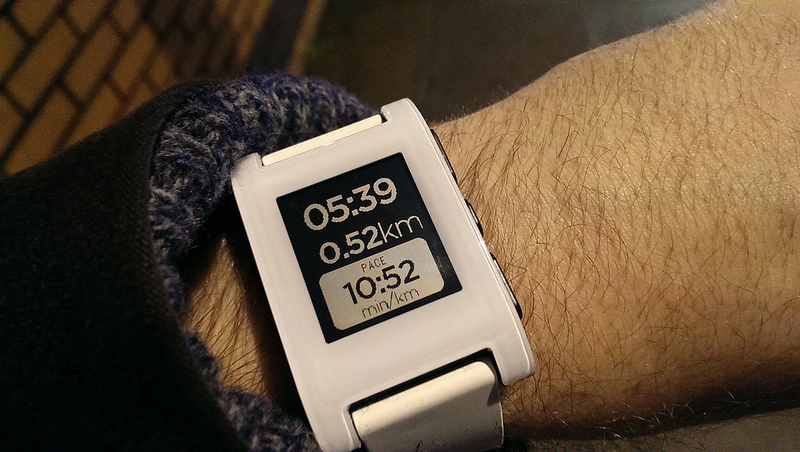
It arrived this morning, and I set it up over my lunch. Here it is –

pebble2

Yes, I went for white.

Now look, I’m brand new to this whole wearable tech thing so I’m quite intrigued about what kind of affect it’ll have on my existing behaviours. In the same way the iPad changed [and actually increased] my reading habits, I wonder what the world of smartwatches, nay, Pebble watches will do to the way I interact with my tech.

Moreover, I know I’m not unique in the Pebble-owning world (I know several people that both own and love theirs), but I am intending on writing up how I get on with it over the coming days, weeks, and months.

Onwards.

Out of the box, the Pebble is fairly simple to set up. You download an app onto your device (I sport 2013’s phone of the year, the HTC One) and then connect to the Pebble over Bluetooth. A minor firmware update later (and of course a spot of charging) and you’re ready to go.

Initial impressions (in no real order)

  • Firmware update didn’t work first time, had to unpair and reboot. Second time it worked like a charm and I hope all future updates are as painless.
  • The Pebble app is fairly limited, and the immediate urge is to download a new one. I’m trying Pebble Notifier [FREE]  but others recommend apps such as Augmented Smartwatch Pro [NOT FREE]. Until I know what I need from my Pebble, I won’t be making the leap quite yet.
  • It works with RunKeeper – YES! No new app installs, it just works. My RunKeeper app on Android shows a teeny little watch icon when it’s working too. Super cool.

pebble3

  • It works with Spotify – YES! Skipping a track is easy and, while track display is also available, I’ve found this to be a bit patchy and doesn’t always have anything to display. But when it does, it’s cool!

pebble4

  • It doesn’t work with my work email account. I’m desperately trying to find a work around but no joy, yet. More experimentation required. To be fair to Pebble, my employer’s email is run on Google Apps and they have IMAP disabled as standard. Bit of a ball ache, but I’m sure I’ll find a way through it at some point. Weirdly, Hangout alerts (and messages) come through just fine, so maybe a tinker with the settings somewhere will help.
  • The Pebble community is HUGE. I joined the Google+ group today (don’t laugh) and I turned out to be their 4000th member. I’m very excited about this.
  • Everyone is talking about ‘Firmware v2’ and the Pebble ‘App Store’ being ‘just around the corner’. Apparently these are good things and I should be looking forward to them. Fingers crossed for that then.
  • In the seven hours that I’ve been using it, the Pebble has already reduced the amount of times I’ve had to pick up my phone. This can only be a good thing.

And that’s it. I’m fully aware that I am very much in calibration mode with this thing at the moment. Each person, each device, and each experience is different. Some people like a lot of alerts, some people don’t.

Slowly but surely I’m working out the hierarchy of what I need and what I don’t (SMS’s? Notify me. Instagram comments and likes? Don’t notify me). And when that process is complete, I think I’m going to enjoy owning this Pebble device very, very much.

More to come, soon.

_______________

Stefan said:

  1. It needs to look good.
    Check! I got the white one, it looks great!
  2. It needs to work with your current device.
    Check! No problems so far.
  3. It has to perform well in terms of battery life.
    Apparently one charge should last seven days, so let’s see.


What phone should I get?

Someone recently asked me:

A good pal in the pub asked what was the best phone apart from the iPhone. What do you think? James Whatley you know about these matters. What’s the best out there on balance?

My response?
_____________________________________

If you’re not looking for an iPhone. Then your choice is Windows Phone or Android. If you want amazing photos, look at the Lumia 925 or the Lumia 1020 (see yesterday’s post for more on that one). The latter outperforms the former in the photography stakes, however the 925 has a more aesthetically pleasing industrial design. 

If photography isn’t your number one reason for having a phone (oh and if, like me, you can’t get on with the Windows Phone 8 OS) then it’s a tie between the Samsung Galaxy S4 or the HTC One – I own and adore the latter.

Finally, if budget is an issue, I’d look at the Google Nexus 4. It is, at the time of writing, Google’s flagship device and is merely an astonishing £159 SIM free on Google Play.

That’s all I got.

Whatley on a phone
_____________________________________

Disagree with this? Let me know.

But while you’re at it, let me know which phones you recommend when people ask you this same question. Those of you that don’t reply with ‘Let me ask Whatley’, that is…


The Lumia 1020 does take GREAT photos

Captain Obvious I know, but still…

One of my favourite 1020 shots to date

I’ve got a full review percolating around my skull for this device (kindly lent to me by the guys at Nokia Connects) but if you’re a regular listener to my podcast, The Voicemail, you probably know where I’m at with it already.

But after spending a couple of days with the device and irrespective of how I feel about Windows Phone, you can’t deny how incredible the camera on the Lumia 1020 really is.

WP_20131005_13_22_14_Pro

Taking it with me on my recent Tough Mudder meant we had some fantastic photos to share when we got back. Good work.

If the only thing you’re looking for in a phone is a decent camera, you simply can’t look any further than the Lumia 1020. Full stop.


Kate Bevan’s piece on the Lumia 1020 in The Guardian
is also worth a look.